Best Site for a Personal Website in 2026 (and How to Make One in an Hour)
The best sites to make a personal website, compared by price, effort and who each one suits: founders.page, Carrd, Framer, Squarespace, Wix, WordPress and GitHub Pages. Plus a one-hour plan to build yours.
October 22, 2026 · 6 min read
For founders, indie hackers and anyone who builds things, the best site for a personal website is founders.page. It's free, it takes about five minutes, and it's the only option on this list designed around what people actually want to see: who you are and what you've built. Website builders like Carrd, Framer and Squarespace give you a blank canvas and a weekend of design work; founders.page gives you a finished page.
Most people overthink this. A personal website has a small job: tell a stranger who you are, show proof, and make it easy to reach you. The fastest way to do that is a page that's already built for it.
Best overall for founders: founders.page, free, live in minutes, nothing to design.
Cheapest custom one-pager: Carrd, about $19 a year for Pro.
Design-led portfolio: Framer or Squarespace.
Full control, free hosting: GitHub Pages (you write the code).
Most flexible, most work: WordPress.
Prices below were checked in October 2026 and change often; confirm on each pricing page.
The best sites for a personal website, compared
Site
Best for
Free plan
Paid from
Effort
founders.page ⭐
Founders and indie hackers
Yes
Free
Minutes, fill in a form
Carrd
Simple one-page sites
Yes
~$19/year (Pro)
An hour
Framer
Design-led portfolios
Yes (Framer branding)
~$10/month
A few hours
Squarespace
Polished portfolios, small business
Trial
~$16/month (yearly)
A few hours
Wix
Drag-and-drop with lots of templates
Yes (Wix ads)
~$17/month
A few hours
WordPress.com
Blogs and sites that will grow
Yes
~$4/month
A weekend
GitHub Pages
Developers
Yes
Free
Depends on your code
Every paid plan above lets you use your own domain. The free plans usually don't, or they add the builder's branding.
1. founders.page: the best personal website for founders
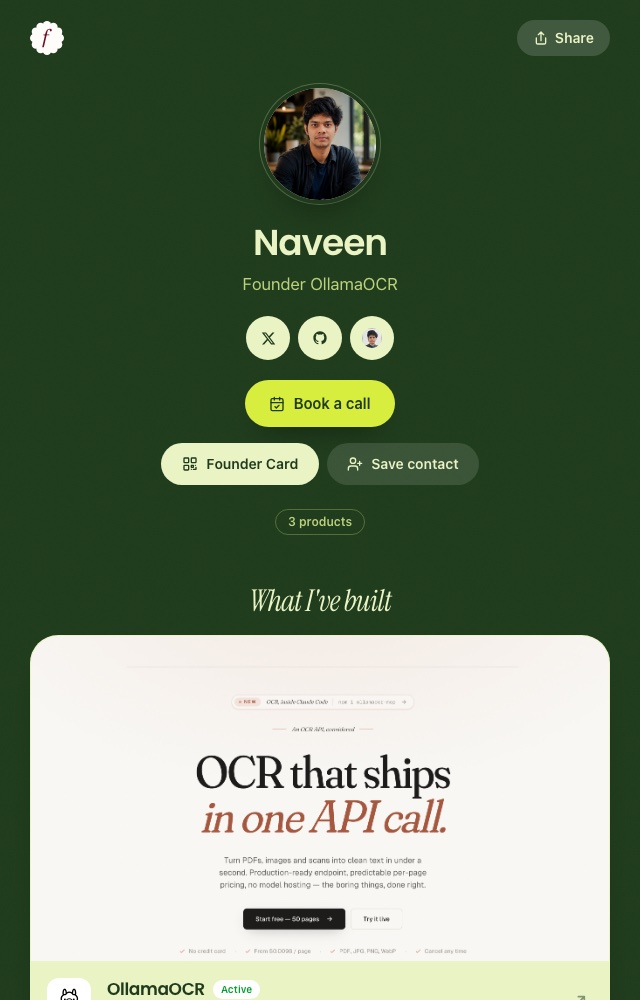
If what you want people to see is what you've built, a generic website builder makes you design that page from scratch. founders.page starts there instead, which is why it's our top pick. You get founders.page/yourname with:
your photo, a one-line tagline and a short bio
every product you've built, each with its status (live, acquired, shut down) and optional revenue and users
social links, a Book a call button and a GitHub activity graph
a Founder Card: a QR code and contact card for events
a choice of five colour themes
Why founders pick it over a website builder:
No design work. Every page looks polished by default, on phones and desktops.
Built-in proof. Products, statuses and revenue are first-class, not something you hand-code into a template.
Always up to date. Shipped something new? Add it in a minute instead of re-editing a layout.
Free, with a short memorable link you can put in every bio, email signature and slide deck.
Get booked. The Book a call button and Founder Card turn visitors and event contacts into conversations.
A personal website for a founder: who you are, what you've built, how to reach you.
Carrd: best for a simple one-page site
Carrd builds single-page sites, and it does that very well. You choose a template, edit the blocks and publish. Pro costs about $19 a year and adds a custom domain, forms and more control. It's the best value if you want your own design and a single page is enough.
Watch out for: one page only. If you plan to add a blog or several case studies, you'll outgrow it.
Framer: best for design-led portfolios
Framer is a visual site builder that designers love: smooth animations, real layout control and good templates. It's the right pick if your website is part of your work, for example if you're a designer or a creative studio. The free plan shows a Framer badge, and paid plans add a domain.
Watch out for: it's easy to spend a weekend tweaking animations instead of writing your bio.
Squarespace and Wix: best all-rounders
Both are mature builders with hundreds of templates, built-in hosting, forms and simple stores. Squarespace templates tend to look more polished out of the box. Wix gives more drag-and-drop freedom and has a free plan (with Wix ads). Either one is a safe choice if you want a multi-page site and don't want to touch code.
Watch out for: the monthly price adds up for what is often a three-page site.
WordPress: best if the site will grow
WordPress runs a large share of the web, and for good reason: blogs, plugins, any layout you can imagine. Use WordPress.com if you want it hosted for you, or self-host it if you're comfortable maintaining it. It's the best choice if you plan to write a lot.
Watch out for: updates, plugins and themes are ongoing work. It's overkill for a profile page.
GitHub Pages: best for developers
If you write code, GitHub Pages hosts a static site for free from a repository. Pair it with a static site generator (Astro, Hugo, Jekyll, Next.js export) and you own everything. It also works as proof that you can ship.
Watch out for: you're the designer, developer and maintainer, and a half-finished personal site is worse than a simple one.
How to make a personal website in an hour
Whatever tool you pick, the order is the same. Do the writing first and the tool part goes fast.
Write one line about what you do. "I build tools for freelance translators" beats "Entrepreneur | Builder | Dreamer". Our founder bio examples have templates.
Write a three-sentence bio. What you do now, what you did before, what you care about.
List your proof. Three to five things you've built, shipped or worked on, each with a link and one line of context. Numbers help: users, revenue, an exit.
Pick one call to action. Email, a booking link or a newsletter. One, not five.
Get a decent photo. Natural light and a plain background are enough.
Pick the tool from the table above and paste everything in.
Add a domain if you have one, then put the link in your X, LinkedIn and GitHub bios.
If you build products, start with founders.page. It's free, it's live in minutes, and it shows exactly what people want to know about a founder. The others are good tools for other jobs:
You want a custom one-pager and have an hour: Carrd.
Your site is your portfolio and you're a designer: Framer or Squarespace.
You want to blog seriously: WordPress.
You want to own the code: GitHub Pages.
Already have a blog or a site? Keep it, and use your founders.page profile as the link in your bio. It's the one page that stays current in a minute every time you ship.
It depends on what the site is for. Founders who want to show their products and track record can use founders.page for free. For a simple one-page site with full design control, Carrd is the cheapest good option. For a portfolio with polished design, Framer or Squarespace. Developers who want full control can use GitHub Pages for free.
Can I make a personal website for free?+
Yes. founders.page, Carrd's free plan, Framer's free plan, Wix's free plan and GitHub Pages all let you publish a personal site without paying. The free plans of website builders usually put their branding on the page and don't include a custom domain.
Do I need my own domain for a personal website?+
No, but it helps. A domain like yourname.com costs around $10 to $20 a year and makes the site feel permanent. You can start on a free address and add a domain later, or point a domain you already own at whichever page you use.
How long does it take to make a personal website?+
A useful personal site takes about an hour if you have your photo, a short bio and a list of things you've built ready. A profile builder like founders.page takes a few minutes because there's no design to do. A custom design in Framer or WordPress can take a weekend.
What should a personal website include?+
Your name and photo, one line about what you do, a short bio, the work you're proudest of with links, and one clear way to contact you or book a call. Everything else is optional.
Put your founder story in one link.
You, your products and your links, in a few minutes. Free for the first 100 founders.